Real 16-bit PNGPhotos + videosNo watermark3 credits per photo · 10 per video second

Depth Map Generator

Pobzy is an online depth map generator that turns a photo or a video into a depth map in seconds: a 16-bit grayscale PNG (white = near, black = far) made by the Marigold AI model, ready for Blender, ControlNet, 3D photos and 3D printing. No watermark.

No photo handy? Try a sample (free):

Video depth map examples

Real results from the Video tab: each clip next to the depth video Pobzy made from it, frame by frame and without flicker. White is near, black is far.

Kabuki dancer on a stageThe costume's folds and the outstretched arm stay clearly in front of the stage and the audience behind.10-second clip · 100 credits
A puppy running across a lawnA small subject moving fast, with the grass fading smoothly into the distance.8-second clip · 80 credits
Camera move through a living roomFurniture at several distances keeps its depth as the camera moves.5-second clip · 50 credits
Astronaut cat floating in spaceAI-generated footage works too: the cat, the suit and the planet each get their own depth.5-second clip · 50 credits

What you get from the depth map generator

A depth map is a grayscale image where each pixel's brightness says how far that point is from the camera. Pobzy's depth map generator estimates it from a single photo or video with AI, so you don't need a depth camera or two lenses. Every number in this table is what the tool does today.

Makes
Depth maps from photos (PNG) and from videos (MP4)
Photo model
Marigold (diffusion-based depth estimation, CVPR 2024), run on cloud GPUs, so it works on any phone or laptop
Video model
Video Depth Anything Small (CVPR 2025, Apache-2.0): consistent from frame to frame, without flicker
Photo output
16-bit grayscale PNG stretched to the full 0–65,535 range, or 8-bit PNG. Processed at up to 1,024 px on the long side and saved at your photo's size
Depth detail
Thousands of distinct depth levels: a test portrait used 3,345, where an 8-bit PNG can hold at most 256, so displacement in Blender doesn't show stair steps
Convention
White = near, black = far, with a one-click invert for tools that expect the opposite
Depth type
Relative depth (the order and shape of things), not distances in meters
Speed
About 5–10 seconds per photo; videos take longer, depending on length
Files
JPG, PNG or WebP up to 10 MB; MP4 or MOV up to 40 seconds and 90 MB
Price
3 credits per photo ($0.02–$0.04 depending on plan or pack), 10 credits per second of video. Failed jobs are refunded automatically
Free extras
Auto contrast, near-detail curve, invert, color maps (turbo, inferno, magma, viridis), a normal map (OpenGL or DirectX) and a 3D parallax video, all made in your browser at no extra cost

Marigold vs. Depth Anything V2

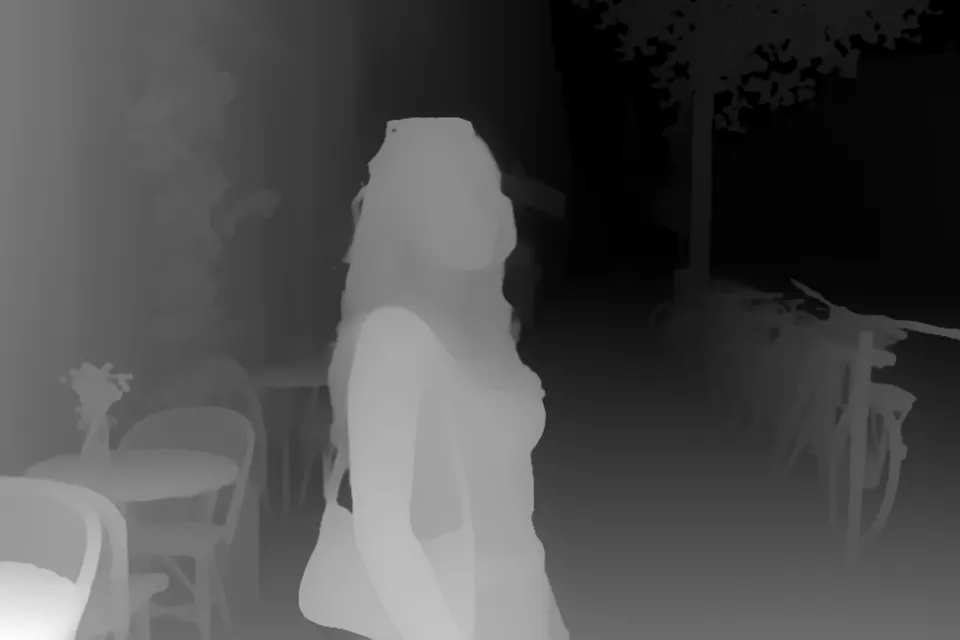
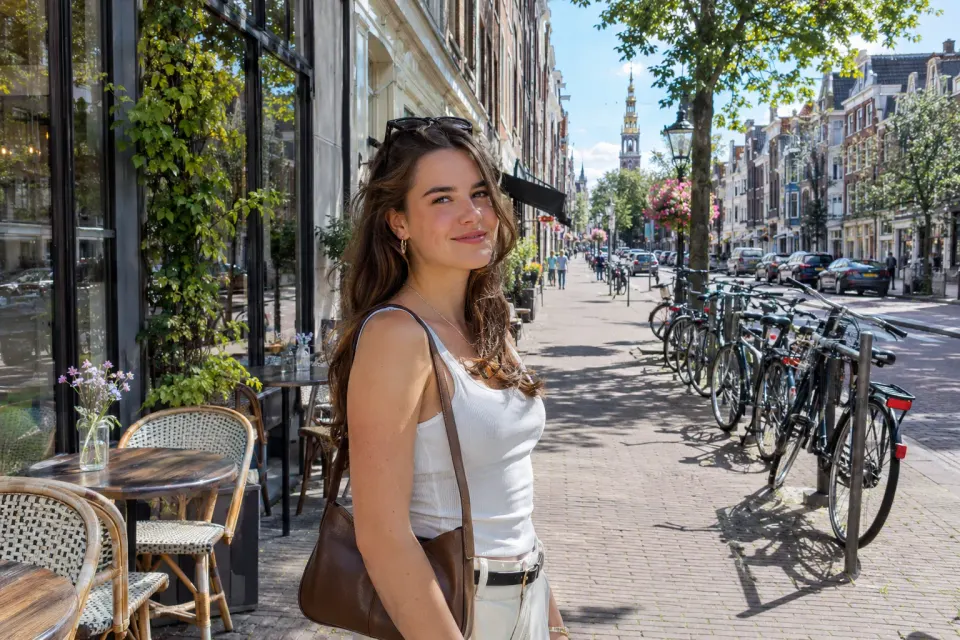
Most free depth map generators run Depth Anything V2. Pobzy uses Marigold for photos. Here is the same photo through both, white = near. Marigold keeps finer edges (the bicycles, the leaves, the hair); the other model has stronger overall contrast out of the box, which Pobzy's auto contrast brings to Marigold too.

Photo of a woman on a sunny city street
Photo
Depth map of a woman on a sunny city street, made by Pobzy with Marigold (white = near)
Marigold (Pobzy, auto contrast on)
Depth map of a woman on a sunny city street, made with Depth Anything (white = near)
Depth Anything V2

Both made on 2026-11-08 through fal.ai: Marigold with Pobzy's settings and auto contrast, the other model with its defaults, then shown as 8-bit grayscale.

How to use your depth map

Blender displacement

Download the 16-bit PNG. Add a plane, give it a Subdivision Surface modifier (Simple, 6+ levels), then a Displace modifier with a new Image texture pointing at the PNG. Set the image's color space to Non-Color, coordinates to UV, Midlevel to 0 and Strength to about 0.1–0.3. 16-bit keeps the surface smooth where 8-bit shows terraces.

ControlNet and Stable Diffusion

Depth ControlNets expect white = near, which is what you download by default, so load the PNG as the control image and set the preprocessor to none. The 8-bit PNG is enough here. If a workflow expects black = near, tick Invert before downloading.

3D photos and parallax videos

Open the 3D view: the photo moves with your mouse or phone, and you can pick an orbit, swing or zoom motion. Export it as a 4-second MP4 or WebM to post on social media, or use the photo and its depth map in any app that builds 3D photos from a depth map.

3D printing, CNC and laser reliefs

Use the 16-bit PNG as a height map, white = high. Most relief tools and slicers that import height maps accept it; in Blender, displace a plane as above and export an STL. Avoid 8-bit files for prints: they produce visible steps in the surface.

Video effects: fog, focus and color

Switch to the Video tab for a depth video that matches your clip frame by frame. Use it as a blur map for depth-of-field (for example Camera Lens Blur in After Effects), as a matte for fog and color grades, or pick a color map for a stylized look.

How Pobzy compares with other depth map generators

There are good free depth map generators. This is how they differ, so you can pick the right one for the job.

ToolPriceAccountVideoPhoto outputModel
Pobzy$0.02–$0.04 per photoRequiredYes, up to 40 s16-bit PNG (normalized), 8-bit, color, normal map, 3D videoMarigold (photos), Video Depth Anything (video), cloud GPU
WaveSpeed (free tool)FreeNot neededSeparate tool16-bit PNG, color, 3D photo videoDepth Anything (Small), in your browser
UpsamplerFree daily quotaNot neededNoGrayscale PNGDepth Anything (per its blog)
Depth Anything V2 demo (Hugging Face)FreeNot neededNoGrayscale, 16-bit raw (not normalized)Small, Base or Large model
Immersity AIWeb plans from $4.99/monthRequiredYesDepth map PNG, 3D and spatial formatsIn-house “Neural Depth Engine”

Checked on 2026-11-08 from each tool's own pages. Prices and features change, so check the sites before you decide.

When another tool is the better choice

  • You need real distances in meters: use a metric model such as Apple's Depth Pro.
  • Photos must never leave your device: use a tool that runs Depth Anything in your browser.
  • You process thousands of images: run Depth Anything or Marigold yourself, for example in ComfyUI.

Depth map generator FAQ

What is a depth map generator?

A depth map generator estimates how far each point in a photo or video is from the camera and saves it as a grayscale image: white is near, black is far. Pobzy does this with AI from a single image, so you don't need a depth camera.

Is Pobzy's depth map generator free?

Pobzy is paid per use: 3 credits per photo (about $0.02–$0.04, depending on your plan or pack) and 10 credits per second of video, with no watermark. You can try every option, including the 3D video, on the sample photos for free without an account.

Is the depth map 16-bit, and why does it matter?

Yes. Photo depth maps download as 16-bit grayscale PNGs stretched to the full 0–65,535 range, with thousands of distinct depth levels instead of 8-bit's 256. That keeps Blender displacement and 3D prints smooth instead of stepped. An 8-bit PNG is available too.

Is white near or far, and can I invert it?

White is near and black is far, the convention ControlNet and most 3D tools use. If your software expects the opposite, tick Invert before downloading; it applies to the 16-bit and 8-bit files and the color maps.

How do I use a depth map in Blender?

Subdivide a plane, add a Displace modifier with an Image texture of the 16-bit PNG, set the image to Non-Color, Midlevel to 0 and Strength to about 0.1–0.3. For Cycles you can also feed it into a material's Displacement output.

Can I use it with ControlNet or Stable Diffusion?

Yes. Depth ControlNets expect white = near, which is the default download. Load the PNG as the control image and set the preprocessor to none. If a workflow wants the opposite, use Invert.

Can I convert a video to a depth map?

Yes. Upload an MP4 or MOV up to 40 seconds and 90 MB on the Video tab and get a frame-by-frame depth video made with Video Depth Anything, which stays consistent between frames. It costs 10 credits per started second.

Does it give real distances in meters?

No. Like most single-image depth tools, Pobzy gives relative depth: which parts are nearer and the shape of surfaces, not meters. For metric depth, use a model built for it, such as Apple's Depth Pro.

Which AI model does Pobzy's depth map generator use?

Photos use Marigold, a diffusion-based depth estimator published at CVPR 2024. Videos use Video Depth Anything Small (CVPR 2025). Both run on cloud GPUs, so your device doesn't need a graphics card.

Can I use the depth maps commercially?

Yes. The depth maps, normal maps and videos you make are yours to use in personal and commercial work. You are responsible for having the rights to the photos and videos you upload.

Which files can I upload, and are they kept?

Photos as JPG, PNG or WebP up to 10 MB, videos as MP4 or MOV. Uploads and results are stored privately in your account so you can download them again; they are not shared. See the privacy policy for details.