MagicaVoxel
Download the .vox file and drag it into MagicaVoxel (or open it from the file panel). Colors arrive as a palette of up to 255 colors, so you can recolor, edit cube by cube and render.
Pobzy Voxel Generator is an AI voxel generator and VoxAI alternative that turns one photo or a short text prompt into a colored voxel 3D model. Rotate it, resize it from 16 to 128 cubes and download it as .vox, .glb, .obj or .stl. A model costs 6 credits from a photo or 8 from text, and changing the size is free.
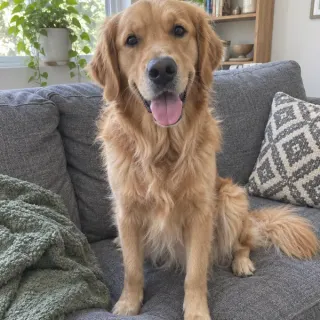
Six real results made with Pobzy Voxel Generator: three from photos and three from text, one of them typed in Chinese. Open one to rotate it, change its size and download it, free.
VoxAI made AI voxel art easy to try. Pobzy Voxel Generator does the same job in one step: send a photo or a sentence, get a 3D model, then pick the voxel size in your browser. Trying 32 or 96 cubes per side costs nothing, because only the 3D model is made in the cloud.
A photo of one object works best: a pet, a toy, a shoe. If the photo shows more than one thing, name or tap the one you want. Or describe an object in a few words, in any language.
AI reconstructs the object in 3D, colors included, guessing the sides the photo can't see. A text prompt is drawn as a picture first.
Your browser turns the model into cubes. Drag the slider from 16 to 128 cubes, rotate it, and download .vox, .glb, .obj or .stl.
Download the .vox file and drag it into MagicaVoxel (or open it from the file panel). Colors arrive as a palette of up to 255 colors, so you can recolor, edit cube by cube and render.
Download .glb: the cubes are merged into a light mesh with vertex colors. In Blender use File → Import → glTF; in Unity or Godot drop it into the project. The model is centered and about one unit tall.
Download .stl: the inside is filled automatically, so it is a closed solid, 1 mm per cube, Z up. Scale it in your slicer. Larger sizes keep more detail; 48 to 64 cubes prints well on a small figure.
A Minecraft schematic export is planned. Until then, use the model as a building reference: at 32 or 48 cubes every cube is one block, and the PNG snapshot shows the colors.
An honest look at the tools people compare. Each one is good at something different.
| Tool | How you start | Price | Downloads | Best for |
|---|---|---|---|---|
| Pobzy Voxel Generator | Photo or text, one step to a 3D model | 6 credits per photo, 8 per text; resizing free | .vox, .glb, .obj, .stl, PNG | Turning a photo or an idea into voxels fast |
| VoxAI (voxelai.ai) | Text or image, pick one of four pictures, then 3D | Credit plans and free sign-up credits (see voxelai.ai) | .vox, .json, .glb, .fbx, .obj | Game developers who want FBX, rigging or picture options |
| MagicaVoxel | Place cubes by hand | Free | .vox, .obj and more | Editing and rendering voxel art by hand |
| Meshy / Tripo + a voxelizer | Make an AI 3D model, then voxelize it in another tool | Paid AI 3D credits | Mesh formats; voxels need a second tool | Detailed models you will voxelize yourself |
| drububu Online Voxelizer | Upload a 3D model or image you already have | Free for non-commercial use | .vox, .obj, .glb, .schematic, .stl and more | Converting a model you already have |
Checked on 2026-11-10. VoxAI's features are from its own documentation; prices change, so check each site.
VoxAI is an AI voxel generator by Metaverse Lab (voxelai.ai) that turns text or an image into voxel 3D models for games, with .vox export. Pobzy Voxel Generator is an independent VoxAI alternative: photo or text to a voxel model in one step, with the voxel size changed for free.
VoxAI gives some free credits at sign-up and sells credit plans; check voxelai.ai for current numbers. Pobzy Voxel Generator has no free tier: a model costs 6 credits from a photo ($0.04–$0.08) or 8 from text, and resizing or downloading again is free.
To build by hand, MagicaVoxel and Goxel are free voxel editors. To convert a model you already have, drububu's online voxelizer is free for non-commercial use. To go from a photo or text with AI, Pobzy Voxel Generator is a paid VoxAI alternative from about $0.04 per model, with no subscription required.
VoxAI first makes four pictures for you to choose from, then a 3D model, and charges credits for each step. Pobzy Voxel Generator goes straight from your photo or prompt to a 3D model, charges once, and turns it into voxels in your browser, so every size from 16 to 128 cubes is free.
Yes. Upload a JPG, PNG or WebP photo and press Make. If the photo shows several things, type the one you want (for example "dog") or tap it. AI builds a colored 3D model of that object, guessing the sides the photo doesn't show, and the page turns it into cubes you can resize.
.vox for MagicaVoxel and other voxel editors, .glb for Blender, Unity, Godot and the web, .obj with vertex colors, .stl for 3D printing, and a PNG snapshot. All downloads are made in your browser from your model, so downloading again in another size costs nothing.
Download the .vox file and drag it into the MagicaVoxel window, or open it from the file panel. Up to 128 cubes per side and 255 colors fit inside MagicaVoxel's limits, so the model opens as one editable object with its own palette.
Not directly yet: a Minecraft schematic export is planned. Today you can use the model as a block-by-block reference: at 32 or 48 cubes each cube is one block, and the 3D view and PNG snapshot show which color goes where.
Yes. Download the .stl: the inside is filled automatically, so it is a closed solid with 1 mm per cube and Z up, ready for a slicer. Prints come out one color unless your printer does multi-color; scale the model in the slicer to the size you want.
Yes. The models and files you make are yours to use in personal and commercial work, including games. You are responsible for having the rights to the photos you upload and for not copying someone else's characters or brands.
No. Pobzy is an independent site. VoxAI belongs to its owners and is named on this page only to compare the two products. Pobzy Voxel Generator is built and run by Pobzy.
A voxel is a 3D pixel: one small cube in a grid. Minecraft worlds and MagicaVoxel art are made of voxels. A voxel model's detail is counted in cubes per side, so 16 looks chunky and toy-like while 128 keeps much more of the shape.
Last updated . See plans and packs (6 credits per photo model)
Pobzy is not affiliated with VoxAI (voxelai.ai), Metaverse Lab, Voxai Solutions or Vox AI. VoxAI is a name of its owners, used here only to compare products.
 Example· Made from this photo